I love the words on the
Evernote site...
Remember everything. Capture anything. Access anywhere. Find things fast.
I have always thought..."Wouldn't Evernote be perfect to use in education?"
As stated on the Evernote for Schools site, "Keep a lifetime of learning at your fingertips. Evernote is a great tool for teachers and students to capture notes, save research, collaborate on projects, snap photos of whiteboards, record audio and more. Everything you add to your account is automatically synced and made available on all the computers, phones and tablets you use."
The possibilities are endless on how Evernote can be used within our schools by students, teachers and the school community.
As I started working with the Evernote for Schools pilot program, I wanted to do a project that would include using multiple devices (iPads, iTouches, laptops and desktops) and the new eBooks in our library collection. I went to the 2nd grade teachers, Tracy Ferguson and Mindy Doggett to see if they were interested in piloting Evernote within Van Meter....and they were in!
After I set up the Van Meter Evernote Group, I invited Tracy, Mindy and the rest of the staff and secondary students to join. Since the 2nd graders do not have school email addresses, I set up an account for each student by creating multiple gmail accounts from my school gmail address. (
This blog post describes how to do this.) Each student would now have an unique login and password to use with their Evernote account.
We also worked together to brainstorm what type of project we wanted to do using Evernote. Tracy, Mindy and I decided to focus on two different themes from their curriculum...."Living and Nonliving Things" in Mindy's room and "My Community" in Tracy's room. I worked with Mackin to develop two sets of eBooks. Once they were included in Van Meter's
Mackin VIA, I created Groups for each one so they would be easy for the students to find and use.
In my initial conversations with Evernote, they told me about
Skitch. Skitch is an Evernote product which,
"Gets your point across with fewer words using annotation, shapes and sketches, so that your ideas become reality faster." Skitch can be downloaded on a Mac computer and is also an Android and iPad app. This would be PERFECT for us to use with the eBooks and Evernote.
The students would research animals and communities within the eBooks. They would use Skitch to make annotations and notes over the top of the pages. The pages would then be uploaded and saved into their individual Evernote accounts. They would also use the iPads to take photographs on walking tours around Van Meter looking for landmarks and animals in their community. Once back to their classrooms, they could use Skitch with the photographs too and save them into Evernote as well.
After each student has saved pages within their Evernote accounts, we will upload them into a "Flickr Set" using the unique email for my Flickr account. We will save them as PDF's and use all of the pages to create two flippable eBooks with the Web 2.0 tool,
Flipsnack. We will be able to share our two Flipsnack eBooks with the school community and others.
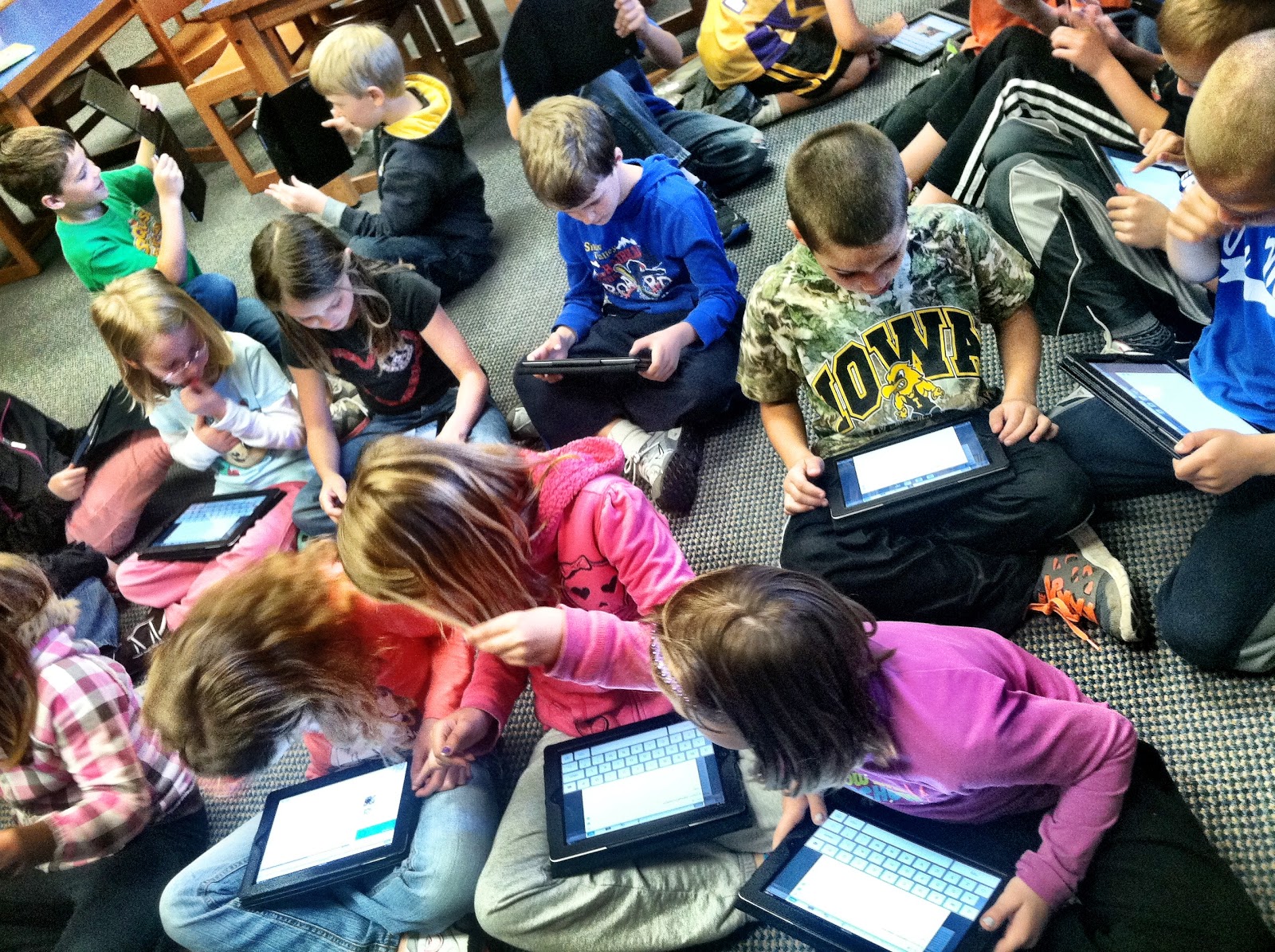
So with everything set and ready to go, I introduced Evernote to the 2nd graders last Friday in the library. Each of them got an iPad and we (I had a few of my 8th graders with me too) helped them log into their new accounts.
They did a wonderful job listening to a few minutes of instructions on what Evernote was and what they could do with it. I taught them how to save different kinds of notes within their accounts.
I then gave them this simple instruction...
"I want you to create three notes within your Evernote account. You can save a voice recording, an image or a type a note."
And they were off!
The second graders were figuring out how to rename the things they were saving and how to delete them from their accounts all by themselves....and I loved watching them help each other.
This boy couldn't wait to get started with his research so he asked me if he could get a book off of the shelf and "
take notes in my Evernote account."
The 2nd graders loved showing off the photographs they were taking with the iPads and storing in their Evernote accounts.
And they were excited to learn that they would be able to get to these notes anywhere once they signed into their Evernote account. One boy said,
"You mean I can log into my account on my iPad at home and look at the pictures I took in the library today?"
We were so happy that the second graders loved Evernote and the projects that we were going to work on during the last month of school.
And as you can hear in Meridan's explaination of Evernote, they really loved today. Being given the opportunity and freedom to use a tool like this was a big deal for them....and they did an amazing job.
I can't wait to see what happens this week as we take walking tours, use Skitch with photographs and the eBooks, and learn even more about Evernote.




 Posts
Posts


